
Choose the steps the micro-app will guide
For assembly, pair each video with the step it demonstrates. For inspection, specify the dimension to check, its tolerance and where to enter the measurement.
Customizing JARVIS
With JARVIS micro-apps, you can tailor the information, actions and steps in a workflow to the person and the task. An operator can follow assembly instructions, a quality inspector can record a measurement, and a manager can decide which project needs attention. Your team can use Claude Code or Codex to build these micro-apps faster with the data, permissions and integrations already in JARVIS.
When building a subassembly, an operator can replay the video instructions before moving on to the next step. At the inspection bench, the inspector records the measured diameter and sees immediately whether it falls within tolerance.
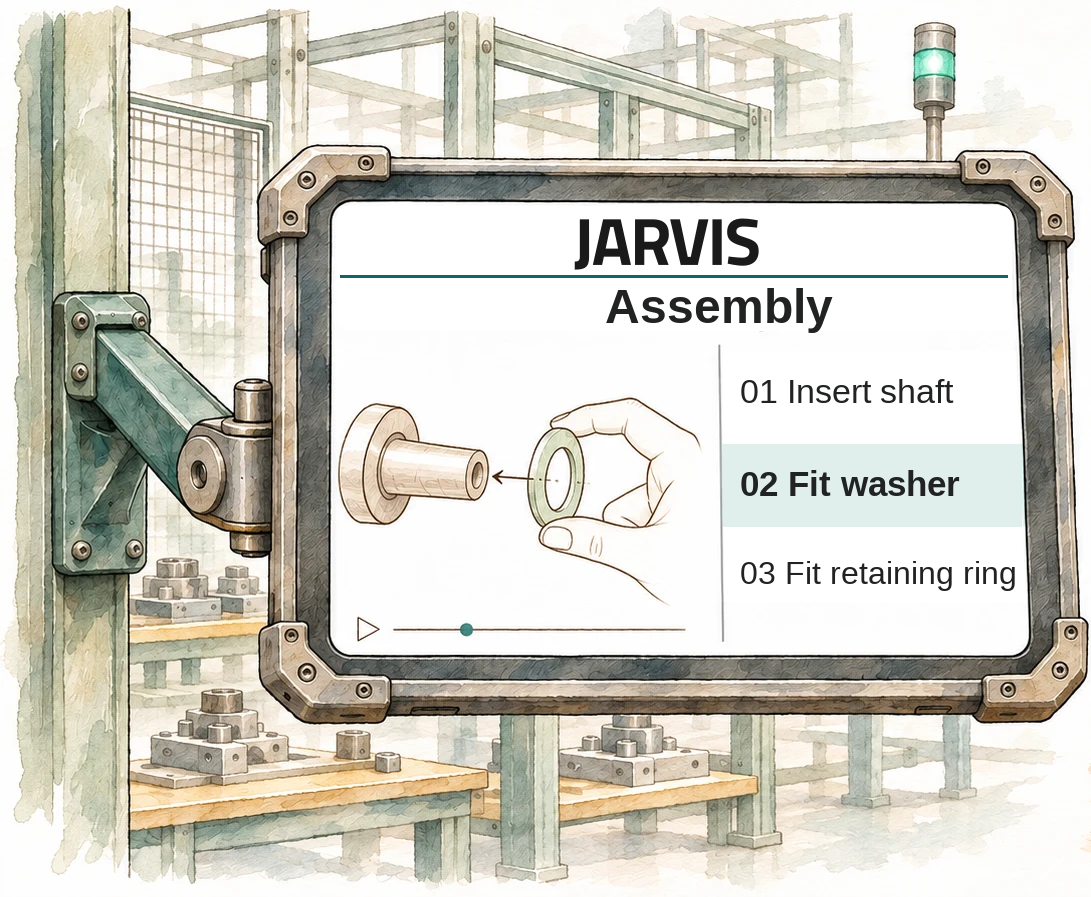
At the assembly station, the operator selects a step from the list on the right of the tablet and watches the video on the left. Step two shows how to fit the washer onto the shaft. The retaining ring goes on next.
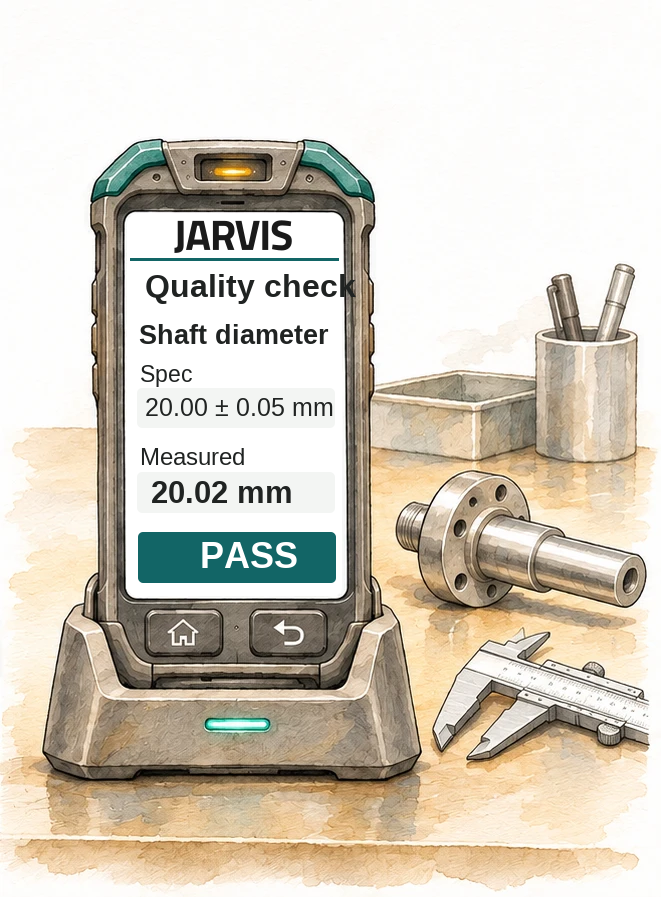
At the inspection bench, the quality inspector measures the shaft diameter with a caliper and enters the reading on the handheld. The shaft specification is 20.00 mm with a tolerance of ±0.05 mm. At 20.02 mm, the reading is within tolerance and the screen shows “PASS”.
Arun (Production planner) shares the portfolio dashboard from his MacBook. On the wall display, Marta (Operations director) and Inês (Project manager) can see where each project stands and how much of its budget it has used. JARVIS can host external applications. If your team already uses a business intelligence (BI) application, you can view its dashboard directly in JARVIS. You can also use a coding agent to build a dashboard tailored to your portfolio reviews.
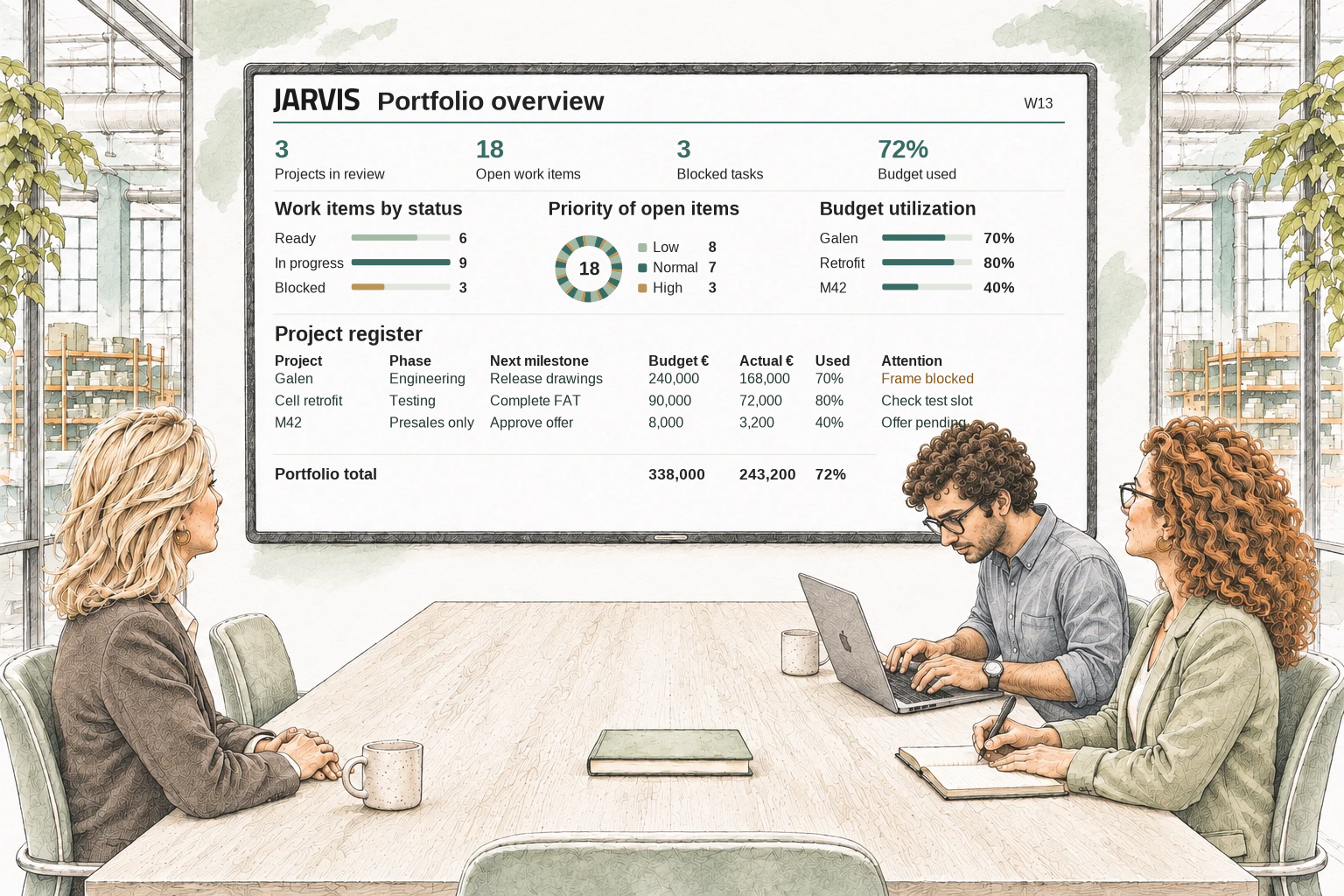
Three of the 18 open work items are blocked. Marta checks their priority alongside the next project milestones. On Galen, frame assembly is waiting on drawings. The team has spent €168,000 of its €240,000 budget. The retrofit is in acceptance testing. M42 is still at the proposal stage, so its costs cover the work of preparing the quote.
View the dashboard at full sizeFor assembly, pair each video with the step it demonstrates. For inspection, specify the dimension to check, its tolerance and where to enter the measurement.
Your developers can use Claude Code or Codex to configure JARVIS and build the micro-app. They add it to JARVIS as a plugin and test it at the workstation with the fields and documents the operator needs.
If a supplier needs one of your drawings to make a part, you can give them a dedicated view. Choose which documents to share, then test the view with a supplier account to make sure it opens the right revision.
JARVIS receives automatic updates with the micro-app installed. If an update changes an interface the plugin relies on, your team checks that the plugin still works.
Claude Code or Codex can help you build a custom micro-app quickly. JARVIS connects it to your business data and workflows. At the inspection bench, for instance, you can link each measurement to the part being checked and the drawing revision used for the inspection.
The micro-app fits into the processes your company already follows. In JARVIS, domain ontologies describe how things like parts, drawings and tasks relate to one another. The platform provides integrations with your business systems, security controls and auditing. Agents that carry out operational tasks can also connect through MCP using the identities and permissions configured in JARVIS.